 Thu, Apr 22, 2021
A whiteboard for every repl
Replit is a place where beginners, educators, and professionals alike can code and share their ideas collaboratively. Something that goes hand and hand with your source code is how you communicate it. We built threads, which allow you to leave contextual messages around code, and added better markdown support for READMEs and other guides. However, we were missing a visual way for people to explain and collaborate around code. Today we're excited to announce support for draw files, powered by excalidraw! Any new file with the .draw extension will become a whiteboard to sketch shapes, draw freely, and add text. These files are multiplayer by default, anyone who joins your repl will be able to sketch and diagram along with you. During this period of remote collaboration, we've used draw files to sketch out problems with candidates during interviews, to diagram how our internal systems work, and to quickly prototype user flows. How it works Thanks to the awesome open source excalidraw project, we were able to combine their library with our infrastructure to treat .draw files just like any other file in your repl. We use the same file structure under the hood, which makes importing from excalidraw a breeze (just save your work on excalidraw.com with a .draw extension and upload it to Replit).
 Sun, Apr 18, 2021
Announcing Secrets Management
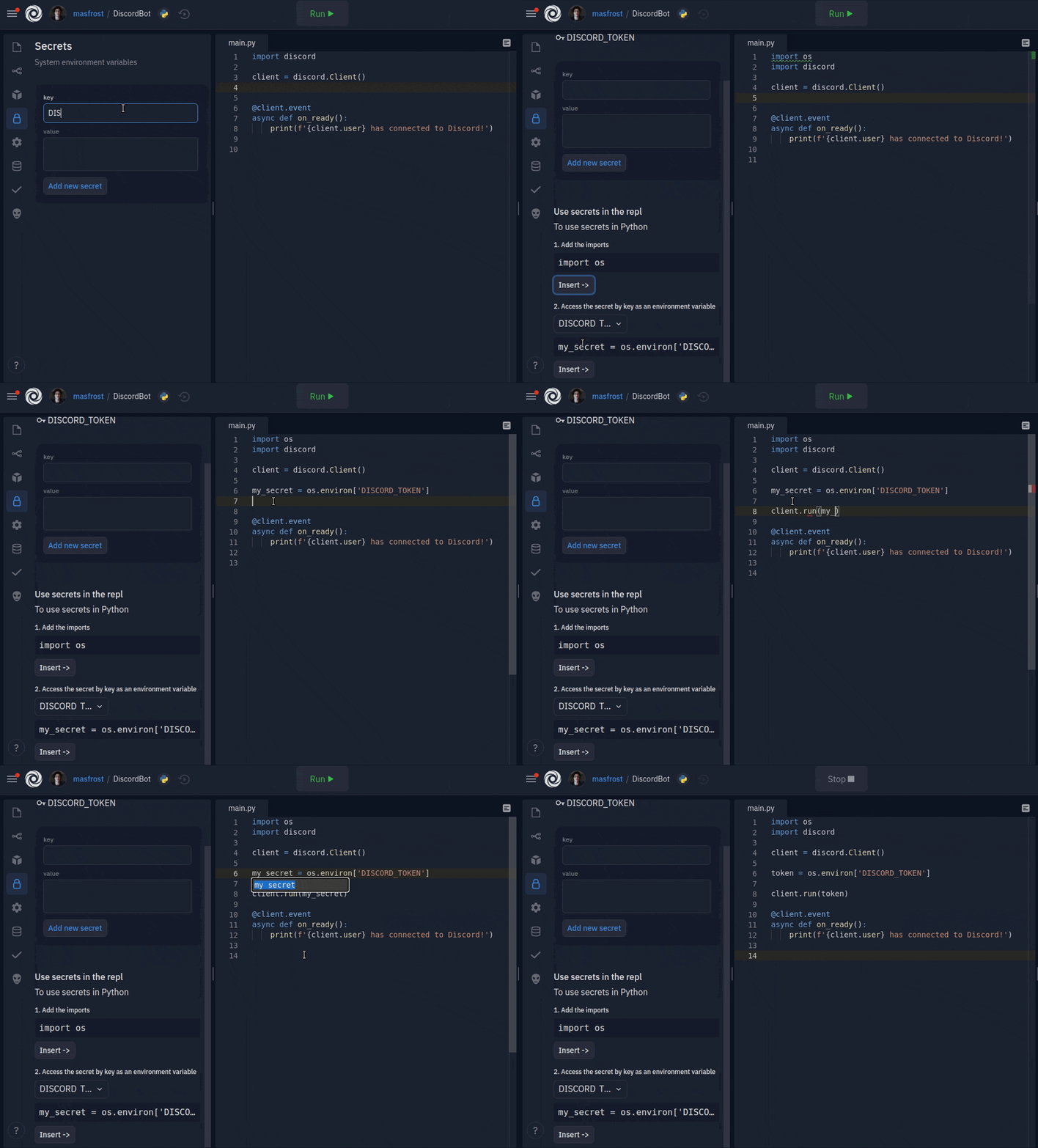
Replit is the go-to place for a lot of people to build their applications. People build chatbots, web applications, games, and so much more. Naturally, projects like this need to maintain sensitive information (secrets). Today we're announcing a new and improved way to manage secrets. To give you an idea of how and when this is useful, let me give you some examples. To build a Discord chatbot, the programmer would have acquired a Discord API key. If the key is exposed, then anyone can come along and send messages as the bot. Before we gave a database for every repl, applications would use an external database with access credentials stored somewhere in the code. Exposing the database connection credentials is disastrous for obvious reasons. When someone builds a web application with authentication (users), the server signs cookies with a cryptographic key, ensuring that the visitors are who they say they are. Stay tuned for an announcement for a Replit authentication system, so you don't have to worry about signing cookies either. Traditionally, people purchased the hacker plan to make their repls private and keep their secrets secure. However, that meant hiding the repl and the code from the world. People wanted to also share their repls with the community. Code sharing allows our community members to get feedback, teach each other, gain customer trust, and get all the goodness that comes with open source. For this reason, in 2019, we introduced the first iteration of the secrets feature to Replit, the dotenv file (".env"). The file followed a line-based key="secret" format, which was consumed as environment variables in the code, only exposing the "key" part and keeping the secret safe. Dotenv served its purpose for our advanced users. They were able to use it to store data and configurations they want to hide. However, dotenv had many shortcomings. Unless people followed a Replit-specific tutorial or went scouring through our docs, the feature was undiscoverable. Beginners required an understanding of environment variables, and an empty free form file was overwhelming. The issues of dotenv even extended to the advanced users. The lack of a public standard for dotenv confused people when following external resources and tutorials. Another problem was that the dotenv file was not an actual file. Still, we communicated it as if it were. Some programmers would try to read it from the file system and be confused because it was not there. We did not write dotenv to the filesystem because forking relied on making a copy of the filesystem of a repl. It also gave us the flexibility of encrypting dotenv and taking other security measures to keep everyone's dotenv safe. It has become apparent to us that we needed a better solution. What made the most sense for us is to add a GUI that is easy to use for learners and keeps our advanced users productive.
 Mon, Apr 12, 2021
Announcing Replit Ventures
TL;DR Replit Ventures will give a grant of $2000 each to 4 startups and 1 non-profit (in Bitcoin) with a chance for more funding later on. They will have additional help with tools, mentorship, networking, and further fundraising. You can apply here. What is Replit Ventures? 💸 At Replit, our mission is to make programming more accessible. Our platform removes friction that exists when building applications. This seamless development process has enabled entrepreneurs to create prototypes, MVPs, and even launch startups all in one place. We're proud to share that there are many ambitious startups that either started or running entirely on our platform (e.g., Fig, Blubbr)- some generating thousands of dollars every month. Our users are building innovative products, and we want to help them grow. Replit Ventures is our brand-new experimental startup incubator dedicated to bringing emerging startups and ideas to market. We want to invest our time and money into the next generation of entrepreneurs. What makes Replit Ventures different? 💡
 Mon, Apr 12, 2021
Meet the college students who used Replit to build a startup with $1,000 in monthly revenue in 3 weeks
Hi 👋🏻, I'm Søren. I'm a computer science student based in Seattle, Washington. I've always been interested in the intersection of finance and computer science and I tend to find myself building things in the space. Before I was offered a position at Replit, I worked as a software engineer at a FinTech startup writing market-making systems for various crypto brokerages. While I was doing this, I was also working on a side-project with my close friends and co-founders Justin and Steven. This project is called Blubbr. What is Blubbr? When we first started Blubbr, we just wanted to make a trading bot. We became interested in the relatively new market of SPACs and had developed a strategy we believed would make us money. A SPAC is a company whose entire goal is to buy a private company and take them public. Before a SPAC is allowed to talk about anything to the public, they have to release a special type of form on the SEC website. We discovered that shortly after companies release these specific forms, their stock prices tend to increase. Blubbr was created based on the premise that if you bought within minutes of the form coming out, there was a good chance that you would make money. How did we build this so fast?
 Sun, Apr 11, 2021
Boosts
Our Hacker plan has always been a great choice if you need more powerful repls. In addition to benefits like private repls, more storage, and always on, the Hacker plan gives all of your repls 4x the CPU and RAM compared to those in our free plan. However, sometimes, even 4x is not enough. Whether you're building a new Terminal or playing Doom, you could blow past those resource limits pretty quickly. That's why today we're excited to announce Boosts! Boosts are a new addition to our Hacker plan that allow you to make your repls even faster. Boosted repls come with 4 vCPUs and 4 GB of RAM which is double the resources of standard Hacker repls (and 8x more than free repls). As of today, we're including 5 free boosts as part of the Hacker plan. However, boosts can also be purchased on a free plan using Cycles. To boost your repl, simply click on your repl's title to bring up the repl info card and click the "Add boost" button underneath the always on toggle like so:
 Thu, Apr 8, 2021
Introducing system audio
We know that games are an important part of our commitment to making programming more accessible, more creative, and more fun. Back in February when we announced a significant revamp to our graphics stack, we also promised that we would also provide system audio integration. That support is finally available today, as an opt-in feature. How to opt-in We are firm believers in the "Don't pay for what you don't use" philosophy. Since enabling system-wide audio is moderately expensive, resource-wise, it's better for this feature to be opt-in. In order to do so, all you need to do is create a secret called VNC_ENABLE_EXPERIMENTAL_AUDIO with a value of 1 and restart your repl by running kill 1 on the shell. Once that's done, a checkbox with headphones will appear in the lower right corner of the VNC output window: Due to restrictions in the browser security model, there needs to be an explicit user interaction when enabling the audio, which means that the checkbox needs to be manually toggled every time the repl is opened.
- Wed, Apr 7, 2021
Securing your graphic repls
Have you ever wished to be able to protect your graphic repls against prying eyes? Starting today, all VNC connections are automatically protected by the same token that keep your connection to the repl secure. There is nothing you need to do, since this is completely transparent. We also acknowledge that some of you want to access your repls with the stock noVNC client. For that case, we are also allowing you to access it with the runner username and a password of your choosing: All you need to do is create a secret called VNC_PASSWORD. Due to limitations in the Remote Framebuffer authentication mode that is currently being used, only the first 8 characters in the password are considered at the moment, so try to auto-generate it with your password manager (like 1Password / LastPass) to make them harder to guess. The detailed steps can be found in our official docs. Don't worry about having to type the password every time you launch it: it will be transparently filled in when you access your repl from the website. Happy graphic repling!
- Mon, Apr 5, 2021
Introducing Kaboom
Games are awesome, making games is even more awesome. I love making games, making games makes me happy, being happy makes me make better games, i hope everyone can be happy and enjoy making games! -- me, today We at replit are thinking about ways to make programming more accissible, Kaboom is an effort to try make game making more accessible and fun for both beginners and intermediate programmers. I want to discuss some core designs of both the library and the editor here. (it's strongly recommended first check out some examples on the kaboom website to get a quick taste of what kaboom looks like) Official website
 Fri, Mar 26, 2021
Welcome to the Wonderful World of Clusters
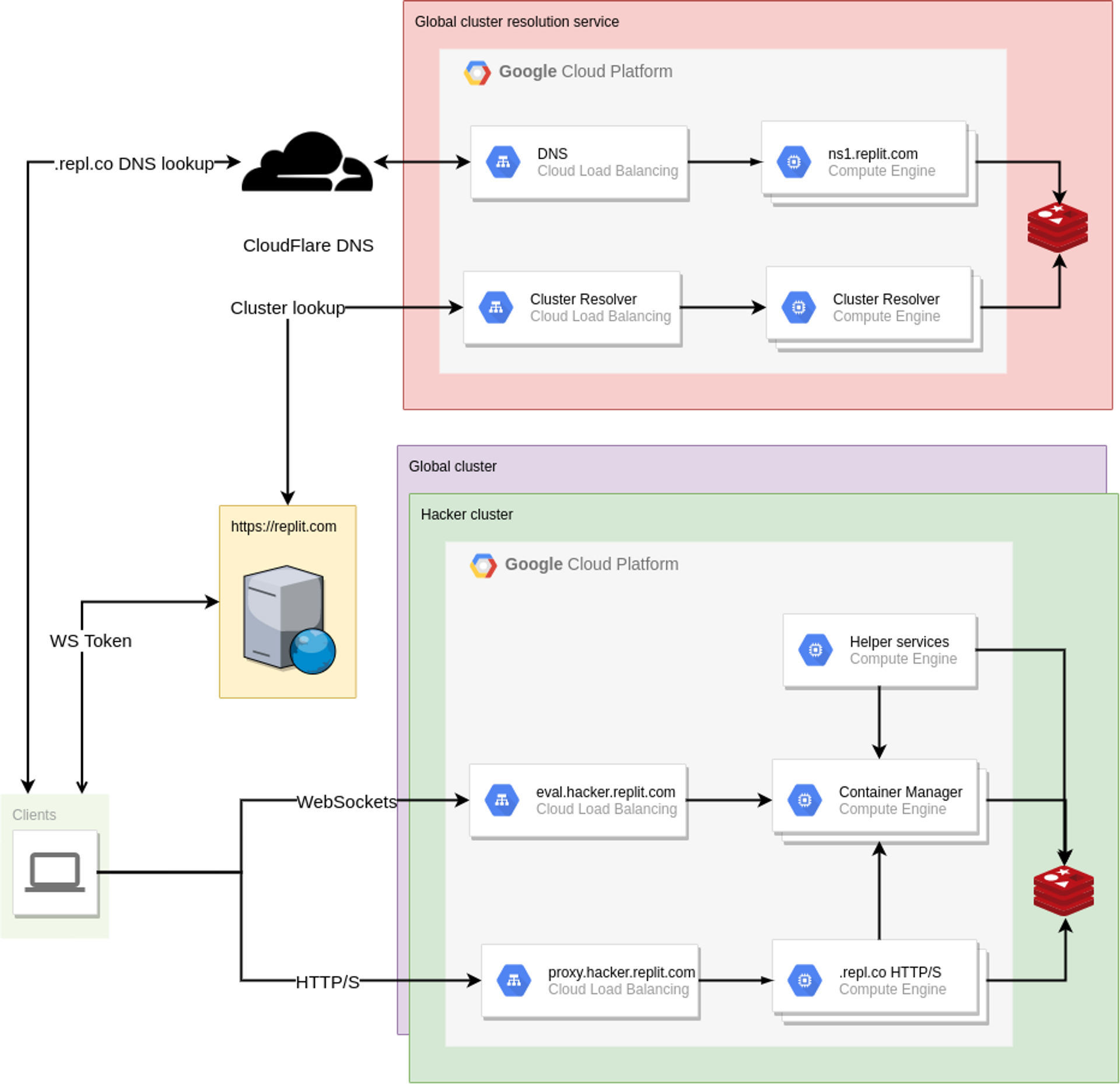
Having a solid foundation is critical for us to be able to fulfill our mission of making programming more accessible, more creative, and more fun. We did a great job of making the platform more stable during last year, but every now and then we would still run into unforeseen problems that cascaded into other parts of the platform, producing a bad experience for everyone. So back in October (just a few weeks after I joined the team) when we had 2 load-related site-wide outages within a week, we knew it was time to do a major overhaul of how our infrastructure handles traffic. And now today, we're announcing that as a side effect of that infrastructure change, Hacker repls now run in newer, more powerful machines, which means that we'll have more room to grow and experiment with more benefits for Hackers (and you might find that things feel a little bit snappier lately). This is the first of a three-part series of blogposts on how we rebuilt our infrastructure over the course of ~5 months. Introducing a new failure domain The original goal of this endeavor was simple, in theory: split the Replit infrastructure into multiple failure domains, so that when (not if) the next incident occurs, it only affects a subset of the users instead of all of them. There are multiple strategies to do so, and we chose to move Hackers to their own failure domain. But what does this split entail? Prior to this change, our backend infrastructure was relatively simple: a Google Compute Managed Instance Group of VMs that run containers, and another one that serves HTTP traffic on .repl.co domains. So in theory if we take the right-hand side of the diagram and make multiple copies of it, treating each one as a completely independent cluster, we solve the problem. Mission accomplished, right? Not quite: clients now need to know where to make their requests to, since they will now need to hit different hostnames depending on which cluster their repls are (since they are now completely independent after all). Clients that wanted to connect to their repl through the workspace were already required to contact the replit.com web server to get an auth token for the WebSocket connection anyways, so it would make sense for the web server to be the source of truth about the repl->cluster mapping. But what about hosting? All repls get a .repl.co domain, and users can CNAME them to be able to get to their app. At this point, the problem started looking very DNS-shaped, and that's kind of what we ended up doing: an external cluster resolution service, that can be used by both the Replit.com web server and individual clients trying to access their apps!
 Mon, Mar 22, 2021
Replit Case Study - Creating a 700+ User Web App in a Month
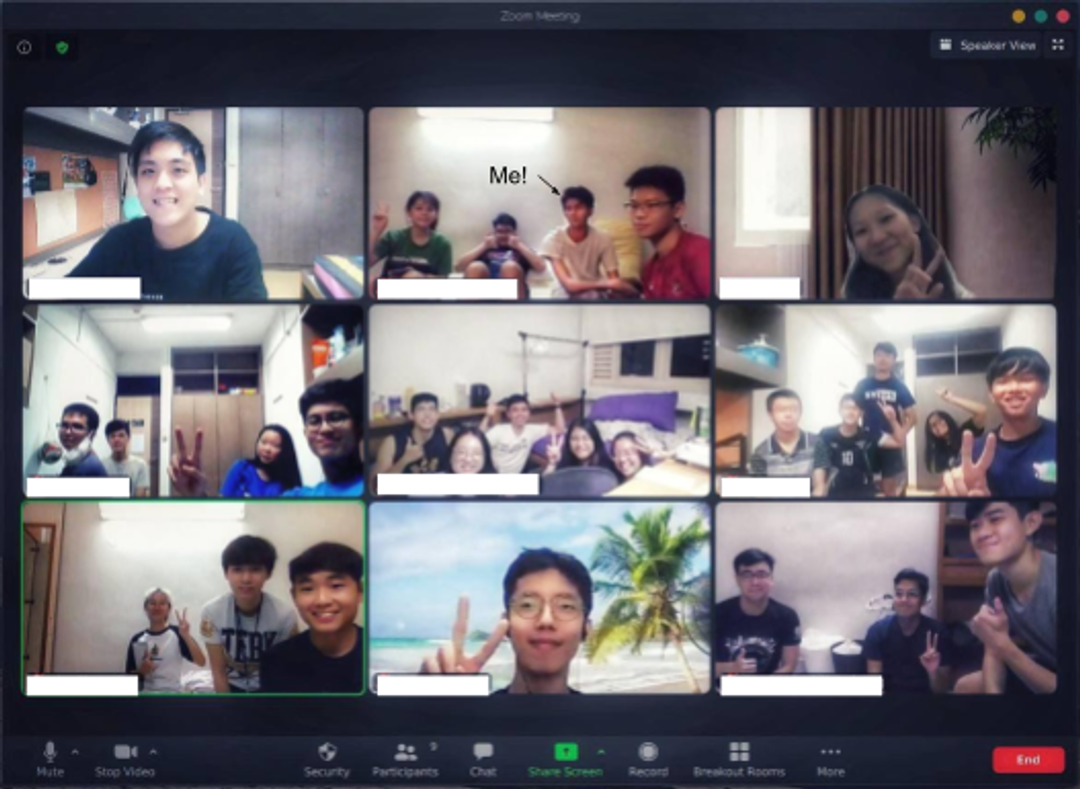
Hey there 👋🏻 My name is Rishabh Anand and I am an ex-resident at the National University of Singapore's (NUS) Raffles Hall of residence. It's one of the on-campus student accommodations that houses students from all levels of undergraduate education at NUS with the majority being freshmen and sophomores. RHDEVS – the software development club at Raffles – was tasked by upper management to build a convenience app for the Hall’s student body. The app itself was nothing new; it has some basic features students would potentially use in their daily hall lives: Laundry Facilities Booking for clubs Events Booking / Management Calendar and Timetable Planner
- Fri, Mar 19, 2021
Introducing the Python package cache
Figuring out how to install third-party libraries can derail people from learning to code or starting a new side project. We built the Universal Package Manager (UPM for short) to save people from having to think about package installation at all. Just import the library, press run, and UPM will install it into your repl! Every time you run a repl or a repl wakes up, UPM checks to see if it needs to download and install any dependencies. This is handy (no matter what's gone inside your repl, it will always have the dependencies it needs) but slow: UPM needs to download typically tens of megabytes worth of packages, extract them on the local filesystem, and sometimes also pre-compile them for better runtime performance. Or at least it used to be slow until yesterday when we enabled the Python package cache, so now the most popular Python packages are pre-populated in pip's cache (/home/runner/.cache/pip), so the download step is going to be mostly gone for the vast majority of Python repls! It also uses pre-built wheels as much as possible to avoid even having to pre-compile code. How does it work? We had two goals in mind when we started designing this: it should be as transparent as possible, which meant that users would still be able to add packages to the local cache while avoiding copying files around (which would have defeated the purpose of using a cache in the first place), and
 Thu, Mar 11, 2021
Replit Case Study - Catalyst Coding Club
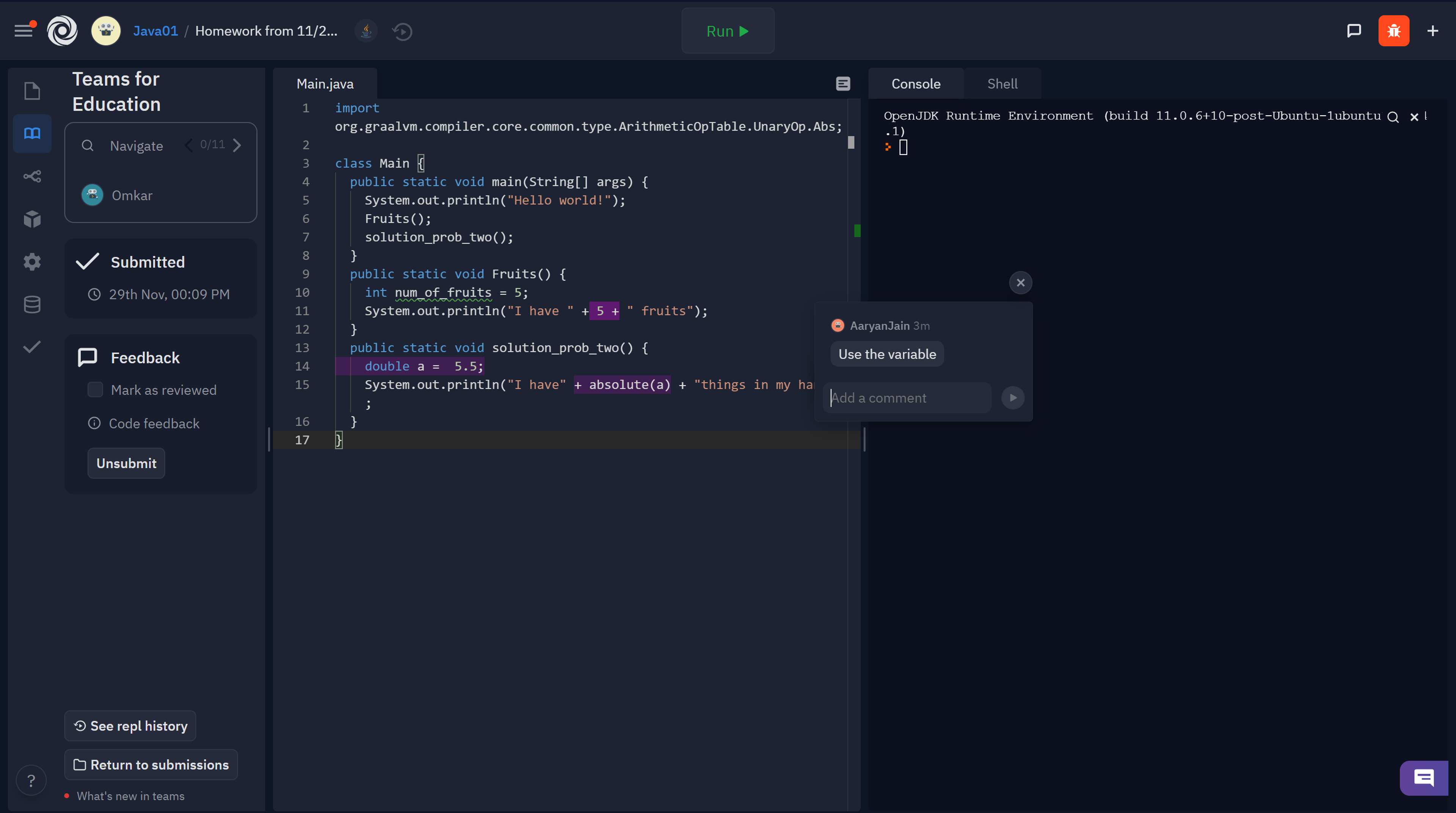
Realizing the lack of exposure to STEM skills for younger students, a group of high school students started Catalyst, a club to introduce students all ages to CS and making sure it is accessible for everyone. Located in Redmond WA, Catalyst strives to produce an environment in which students can thrive and become passionate about the technological world. It is our goal to help ensure students in our community get the exposure they need to computer science and make an informed decision about their future careers. Working on projects and organizing discussions are only a couple of the ways we go about exploring computer science. Whether it is the intricacies of a Python Loop, the making of a div in HTML, or the application programming in Java, we strive to inspire genuine interest in our students over the span of a school year. With the rise of COVID-19 in the United States, many states were forced to shut down schools and resume operations online. This has been detrimental to the learning capabilities of students, especially the younger ones. Now that most resources have been moved online, schools and organizations have been looking for programs that can help aid them in teaching various concepts to students and help those especially at a younger level learn about various concepts using simulations. Our organization was many of many that needed a way of teaching coding online to our students. Transitioning to online learning as a club has been difficult for us because usually in a normal environment, we would be able to help students debug their issues in person. Adding on to that most of the issues beginners and students face is with the editor itself. We searched for resources that can help us teach these passionate students about CS for several weeks, and that is when we stumbled upon Repl.it. Repl.it is a solution that fixed most, if not all of our problems. We didn’t have to worry about editor issues thanks to the built-in editor Repl.it has that supports several languages, from Python to Java to HTML. Not only does it have a built-in editor, it also has a unique suggestion system which helps us teachers pinpoint problems in the students’ code. Repl.it is built with many features that all in all really help us teach our students and make learning CS a lot easier and complex algorithms more understandable.
 Wed, Mar 10, 2021
Markdown Preview
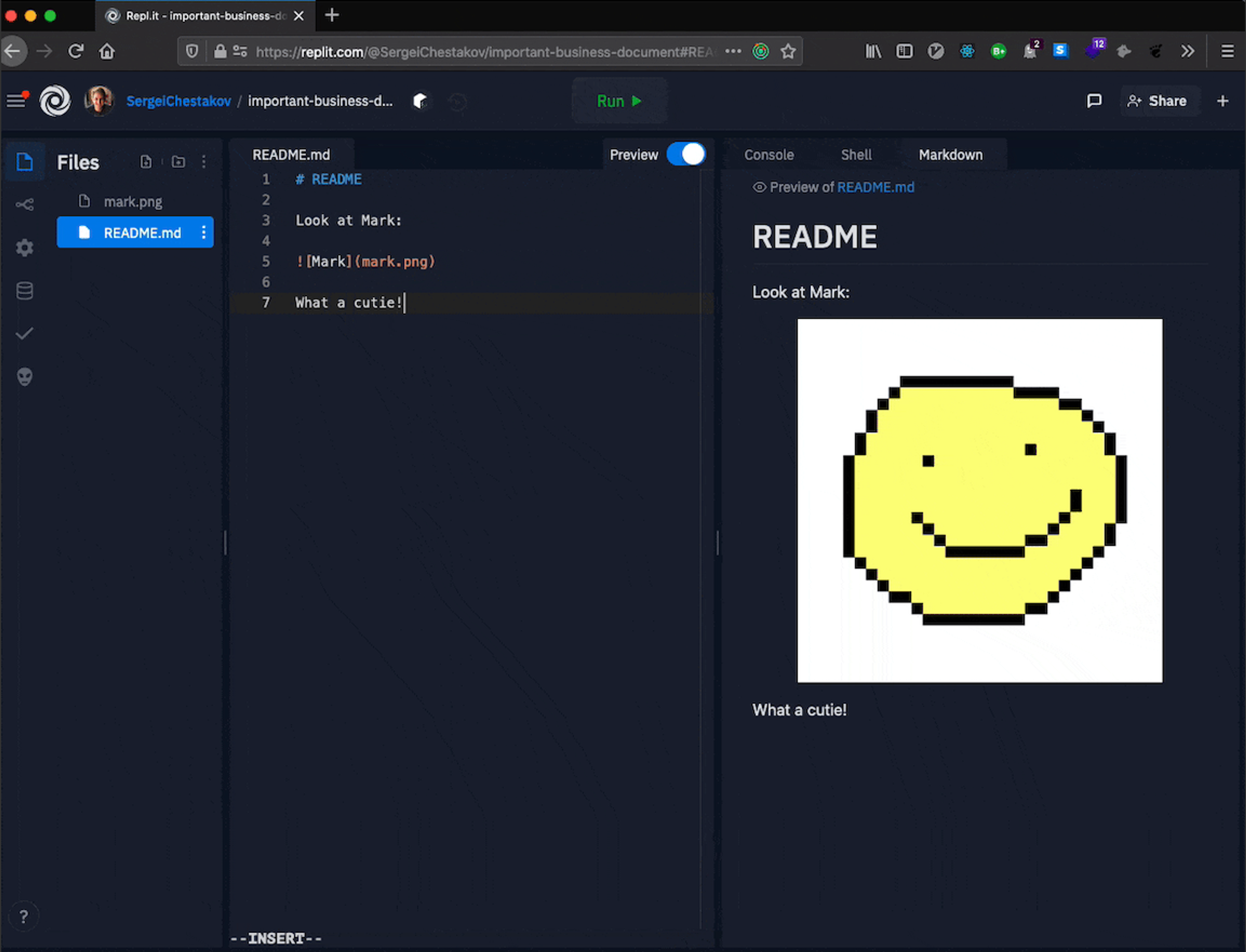
It's always been super fast to start writing markdown in a repl. However, the more we used it, the more we realized there were some key features we were missing that would make our lives easier. Which is why we're excited to announce all of the new improvements we've made to the markdown editing experience on Replit! Now, if you open up a markdown file (a file with a .md extension), you'll notice that a new tab appears to the right of your editor with the file's contents. This allows you to see a live preview of the rendered markdown right as you type it! You can also toggle the preview off if you no longer wish to see it. The file that's being previewed will persist in the markdown tab until you open another markdown file or toggle it off explicitly. This has the added benefit of being able to see instructions or notes, like the repl's README, alongside your code. You'll also notice in larger documents that the preview window stays synced with your current position in the file. As you type or move your cursor in the editor, the markdown pane will scroll with you, consistently keeping your cursor in the center of view. Lastly, we've added the ability to render local images that you reference in your markdown file directly in the preview pane!
 Tue, Mar 9, 2021
Replit Dotcom
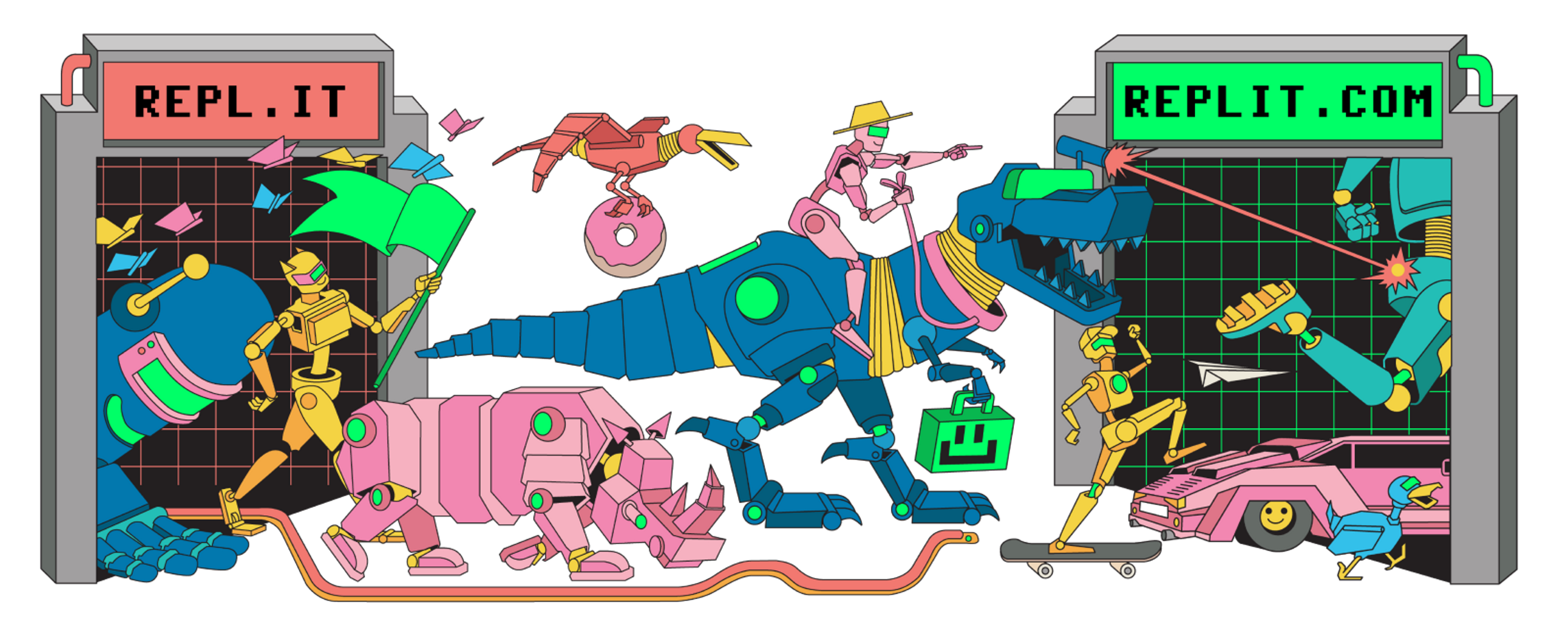
tl;dr In the next few days, we'll be moving domains from "repl.it" to "replit.com." Nothing is required on your end -- all urls will automatically redirect and you'll remain logged-in (as if by magic). Nothing else changes. We prefer if people referred to us as "Replit" (pronounced rep-lit 🔥). To understand the origins of our name and how we got here, it's useful to tell you the Replit genesis story: Back in university, where I was studying Computer Science, I had to set up a development environment for every subject on each computer I wanted to use to work on homework. Whether it was object-oriented programming in Java, Data Structures in C++, or Operating Systems in C, they all had their unique setup process complete with gigabytes worth of IDEs, system dependencies, and packages to download. Even worse, IT admins locked down some computer labs at school, and you had to chase them down to install software. Still worse, sharing code was a nightmare. You had to email files around, and more often than not, they didn't run on the professor or other student's machines because of versioning issues. Around the same time, we saw giant leaps in browser and web technologies. Inspired by Google Docs, I had an idea: Why not write and run code in the browser. Make it extremely easy to share code in a reproducible environment. Another inspiration for such a system was a cloud portable Virtual Machine where you wrote code and shared the entire machine that could be cloned by others. Another mental model useful for inventing what became Replit was REPLs—inspired by Paul Graham's Lisp essays, SICP, and Scheme—I thought a REPL was the easiest way to spin up an environment to learn to program. After years of work, in 2011 we had a prototype, which we initially called "JSRepl".
 Mon, Mar 8, 2021
Introducing Threads: Have Conversations Around Code
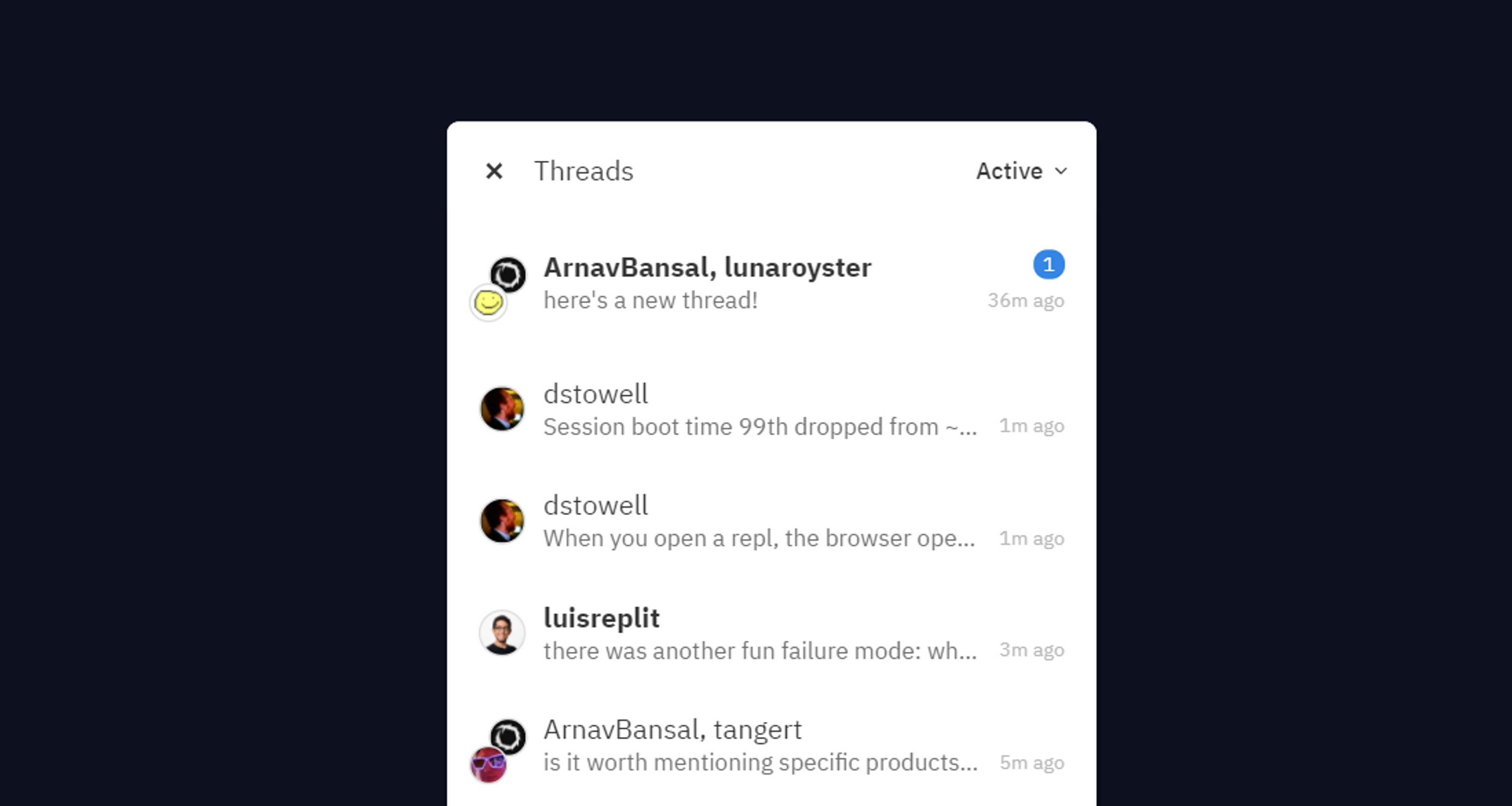
A few months ago, we announced Annotations for our education users, a feature which lets Replit collaborators highlight code and discuss it in context. As classrooms were remote, Annotations became a major part of our teachers' workflow. Over a 100,000 annotations have been created since its launch. Students have used it to ask questions and clear doubts. Teachers have used it to provide feedback, and help students debug issues with their code. We've learnt a lot from them. And now, we're building Threads to make the experience complete. As repls have become more powerful, the way people use them has evolved.