
 Tue, Nov 3, 2020
reCAPTCHA and the anonymous experience
When we started Repl.it, we set out to remove all friction from getting started with programming. That also meant getting out of the way and letting you code as quickly as possible. As part of that, and for a long time, you could start coding on Repl.it without a user account. We anticipated that giving free unfettered compute to the universe would be challenging. Still we didn't flinch and made it a point to innovate on sandboxing, security, and anti-abuse tools, and we've been largely successful at that. Today, Repl.it the largest open compute platform on the internet, one where you don't need a credit card or even an account to start executing. We run 150,000 concurrent containers, which is 10x what we used to run last year. We have our fair share of war stories, like when we had to battle dark-web hackers trying to sell DDoS attacks from our site for Bitcoin. Luckily reCAPTCHA from Google was a massive help, protecting against botting made it possible for us to continue to grow and offer our services for free. Sadly, earlier this year, Google surprised us that they're going to be charging for reCAPTCHA. Of course, it makes business sense for them, but for a startup like ours, operating at the scale we operate at, it meant that we have to pay them more than we make in monthly revenue[1]. That leaves us with two choices: leave the site vulnerable to botting and attacks resulting in an immense amount of time spent fighting abuse and risking outages
- Sat, Oct 10, 2020
Programming Language Jam Results
We're thrilled to announce the PL Jam results. Here are the criteria our judges used: Freshness: How novel are the ideas behind the language? This accounts for the most points since it's the Jam's theme. Value: How practical/useful this language could be? Polish: In its current state, how polished is the language? Technical difficulty: How hard was it to implement? The overall winner will take home a total of $10,000 (prize + grant). We also picked a winner team per category, which will receive $500 each.
 Mon, Oct 5, 2020
How Fig Shipped an MVP in Two Weeks During YC
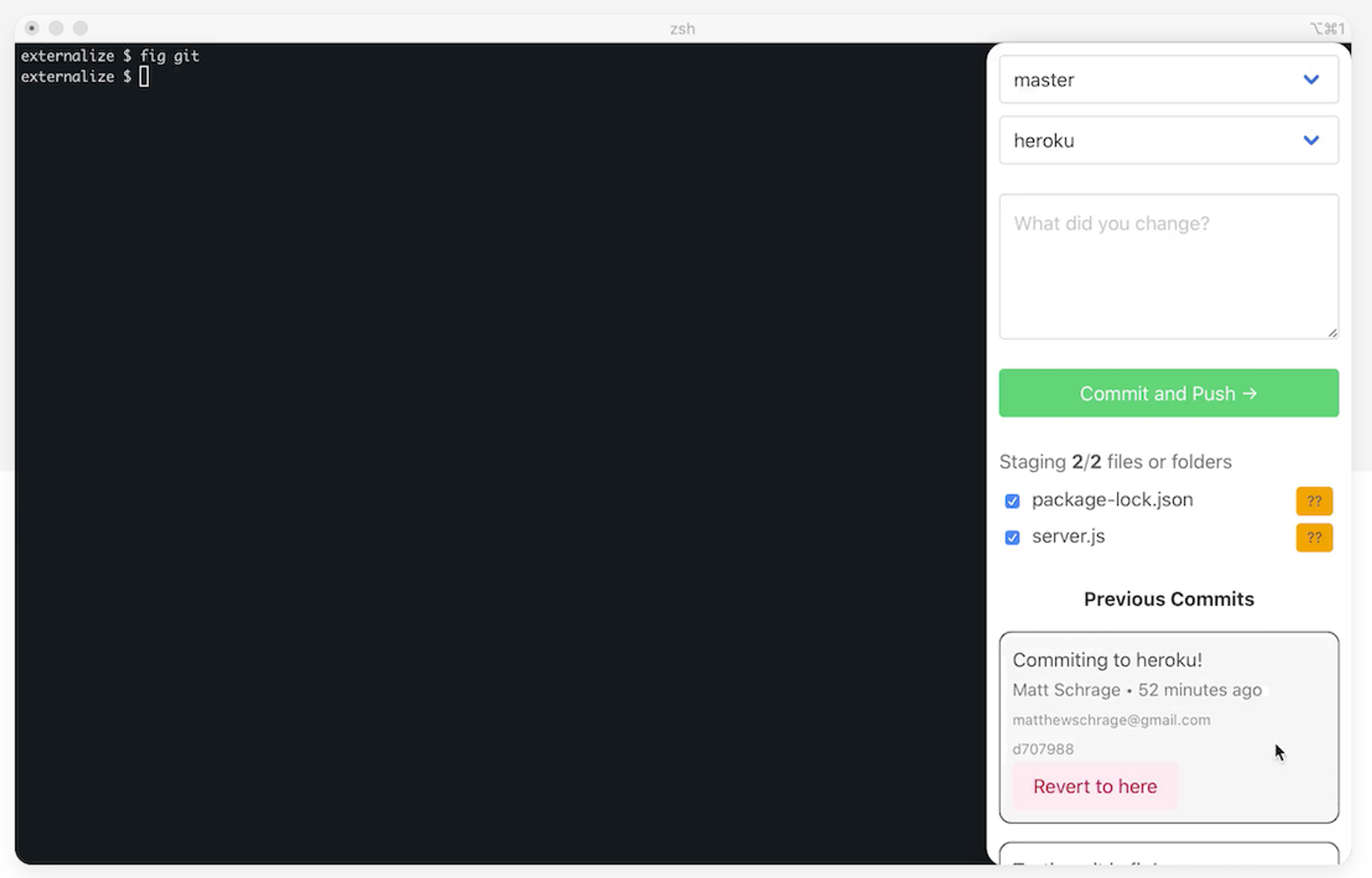
My name is Brendan Falk. I am one of the co-founders of Fig (YC S20). Fig adds visual apps and shortcuts to your Terminal. We make it easy for developers to build visual apps that streamline terminal workflows. We then let developers share apps with their team and the community. Our website gives a good demo. After going through various pivots in early 2020, we realised that the Terminal was a huge pain point for us. We wondered if we could build a tool that would make our own lives easier. But rather than creating a new terminal, we wanted to attach to our existing Terminal. In late April, we started exploring whether building a tool like Fig was even technically possible. On the 15th of May we decided to go all in on Fig. Roughly two weeks later, we had a simple MVP in users' hands. YCombinator pushes companies to move fast. Repl.it helped us move fast.
 Mon, Sep 28, 2020
Code Annotations (available now for Teams for Education!)
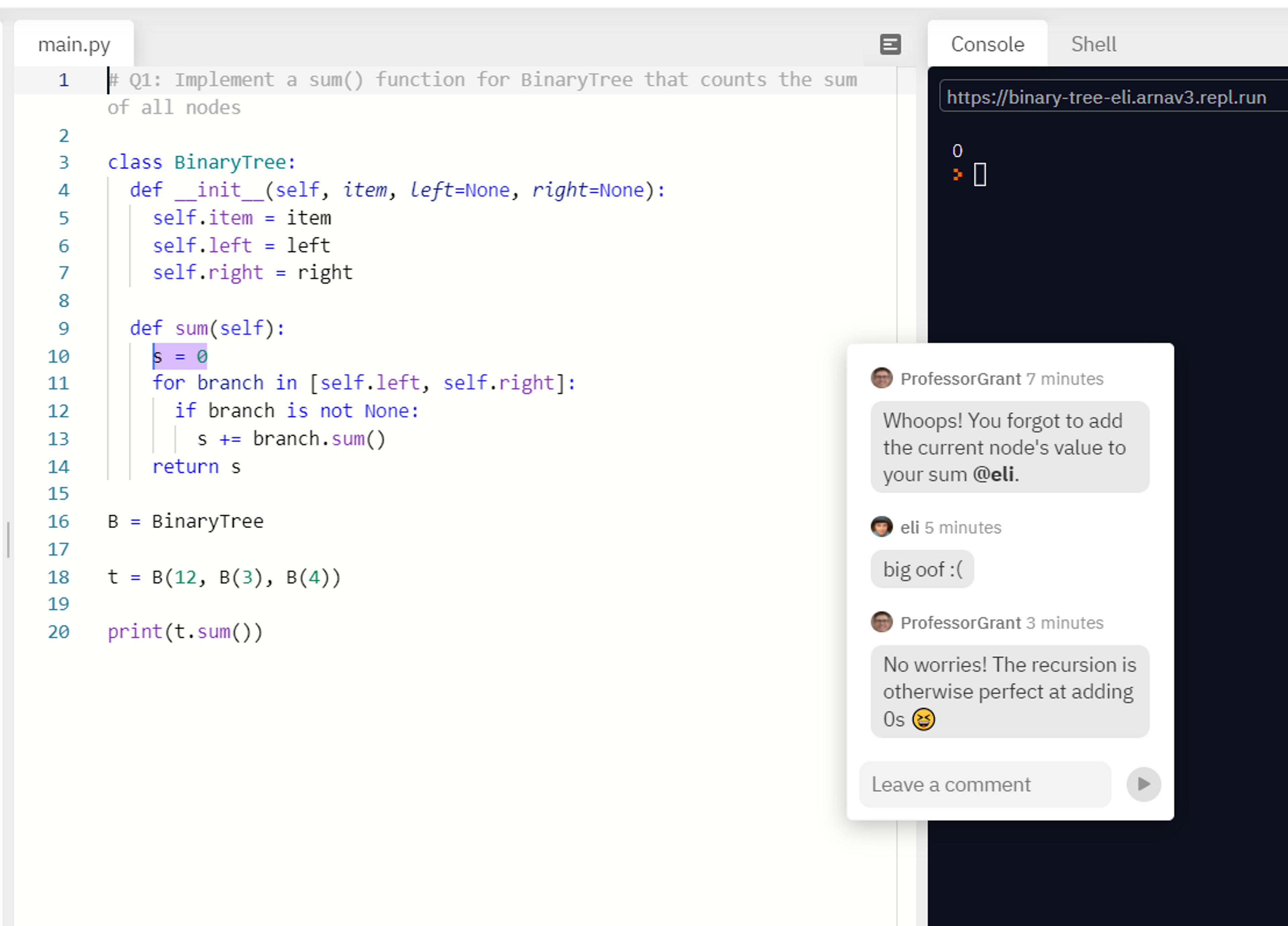
The future of programming is collaborative. To this end, we've just added a new feature that unlocks a lot of potential for educators: the ability to annotate code. Annotations make it easy for students and teachers to communicate. You can point to particular sections of code, clear doubts about syntax, and question decisions during code reviews. And it's simple to use: just select a piece of code, click the floating annotate button, type in a message, and send. Once you create an annotation, it functions like chat: you instantly see your collaborators reply and can talk about code in real-time, just like how you write it. Remote learning This year, as students learn to code online, they are missing out on 'shoulder-to-shoulder debugging', where they work with their peers or teachers on the same screen to fix the inevitable bugs that beginners face.
- Sun, Sep 20, 2020
Focusing on a solid foundation
At Repl.it, our mission is to make programming more accessible, more creative, and more fun. A place away from the modern software development grind. It’s an ambitious mission, and it's already resonated with millions of coders who followed their creative energy to build great apps, like repl.email, a free email service built and hosted entirely on Repl.it and available to anyone with a Repl.it account. Repl.it has grown so much in the past few years: To give you an idea of the scale we're operating on, we now serve 120k concurrent containers. That is 120,000 computers started at once We doubled our team every year for the past 4 years: 2^4 = 16, and are still hiring Repl.it went from a simple online REPL to a world-leading collaborative coding environment focused on learning and prototyping However, with growth comes problems:
 Sun, Sep 13, 2020
A database for every repl
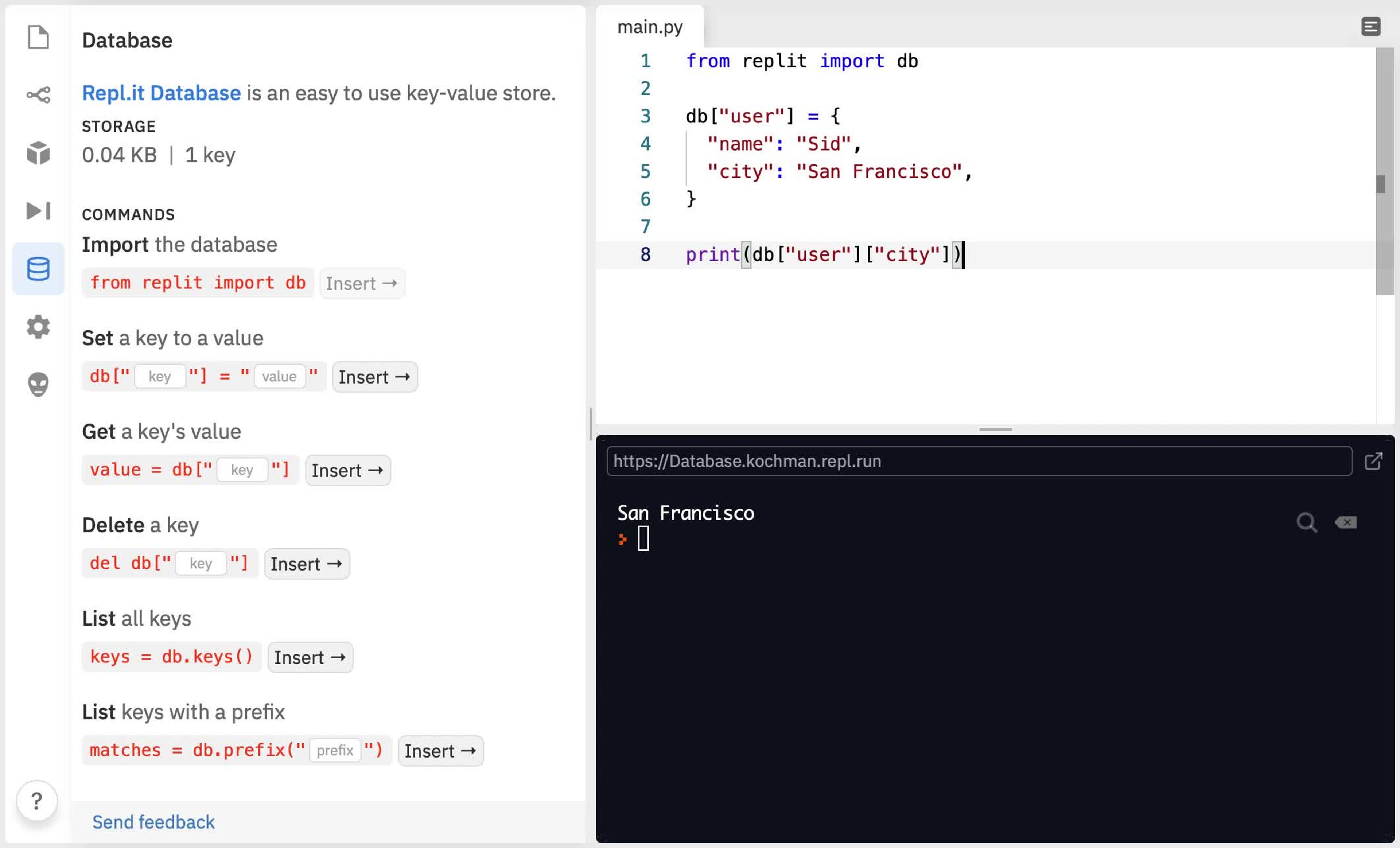
Repl.it is already the best place to build your apps. But there was a missing piece: where do you store your data? We’re introducing Repl.it Database: a fast, free, and easy key-value store that’s built into every repl.[](preview end) All you have to do is import one of our packages for Python, Node.js, or Go, and you can instantly start setting keys in your database. Because Database is built-in, there is no setup, provisioning, or configuration. It's the fastest and easiest way to store data on Repl.it.
 Wed, Aug 26, 2020
CLUI Command bar and Search
One of the challenges of adding new functionality to any interface is balancing discoverability with visual clutter. We've written before about how a universal command bar can be a great way to expose features without overloading the UI with buttons. This pattern already works well for us in our mobile interface, so now we're bringing it to desktop! Here's a demo of what it looks like: The new command bar replaces our old shortcuts and file switcher modal. Just like before, you can use keyboard shortcuts (Cmd/Ctrl + P to switch files, Cmd/Ctrl + K to bring up all the options, etc) to interact with it. As we add more commands, power users will be able to have a keyboard centric experience while beginners can learn about features by exploring the different options. Among the new features introduced in the updated command bar is Search! Search indexes the contents of every file in your project (with the exception of hidden files such as node_modules and anything in your .gitignore) and allows you to see every instance of a query across every file in your repl. From there, you can scroll through the results, see which line and file they appear in, and select a result to navigate directly to that line in the code like so:
 Fri, Aug 7, 2020
The role of AI in coding
Update: To stay up to date on Replit and AI, check out our Ghostwriter Beta & AI mode announcement. In it we discuss how we infused state-of-the-art intelligence into nearly all IDE features as well as the future of AI on Replit. In the past decade, we've seen an explosion of innovation in AI and machine learning. However, coding itself was barely touched by AI. The most significant example of AI-powered coding tools is editor autocomplete extensions like Kite or Tabnine. At Repl.it, we believe this is about to change. With the advent of natural language models like GPT, for the first time, we're seeing an ML model that performs shockingly well on all sorts of language-related tasks including coding. I was first introduced to and excited by the applications of natural language models in coding when I read the 2012 paper "On the Naturalness of Software," which leveraged an incredibly simple NLP technique called n-gram to build an autocomplete engine that rivaled industry standards. GPT-3, the newest model from OpenAI, is a multiple order of magnitude in power, making it feel closer to magic. We got access to the new model, which still in beta, and we quickly got to work building coding tools: Reading code is hard! Don't you wish you could just ask the code what it does? To describe its functions, its types. And maybe... how can it be improved? Introducing: @Replit code oracle 🧙♀️ It's crazy, just got access to @OpenAI API and I already have a working product! pic.twitter.com/HX4MyH9yjm — Amjad Masad (@amasad) July 22, 2020
- Tue, Jul 28, 2020
Shareable Computing
This is a guest blogpost by GPT-3, the new AI software from OpenAI. We only gave it the title and "Repl.it" and it generated the following post for us For a while, I wondered why it's so hard to share code. Surely sharing webpages is easy, since you can link to them with a URL. But webpages are static. They're basically just text files. Their content never changes, so there's no reason to try to sync it. What changed my mind was the birth of "repl" programming. With repl, you type your program into a text box, press a button, and it runs immediately. A second text box shows its output. Repl turns programming into an activity like writing prose, in which you revise continuously, as many times as you like, and always with access to the latest version. I used to write my first drafts on paper, and then rewrite them in Word, or Google Docs. But repl turns code into the equivalent of a first draft. At first, repl was strictly for "quick-and-dirty" programming. But now that it's become popular, more and more people use it for serious coding. And repl is inherently more social than code sharing has ever been. Even if you're the only person in the world working on a particular program, you can invite your friends to code with you by sharing your repl, and anyone can see the source code.
 Sun, Jul 26, 2020
Emmet support
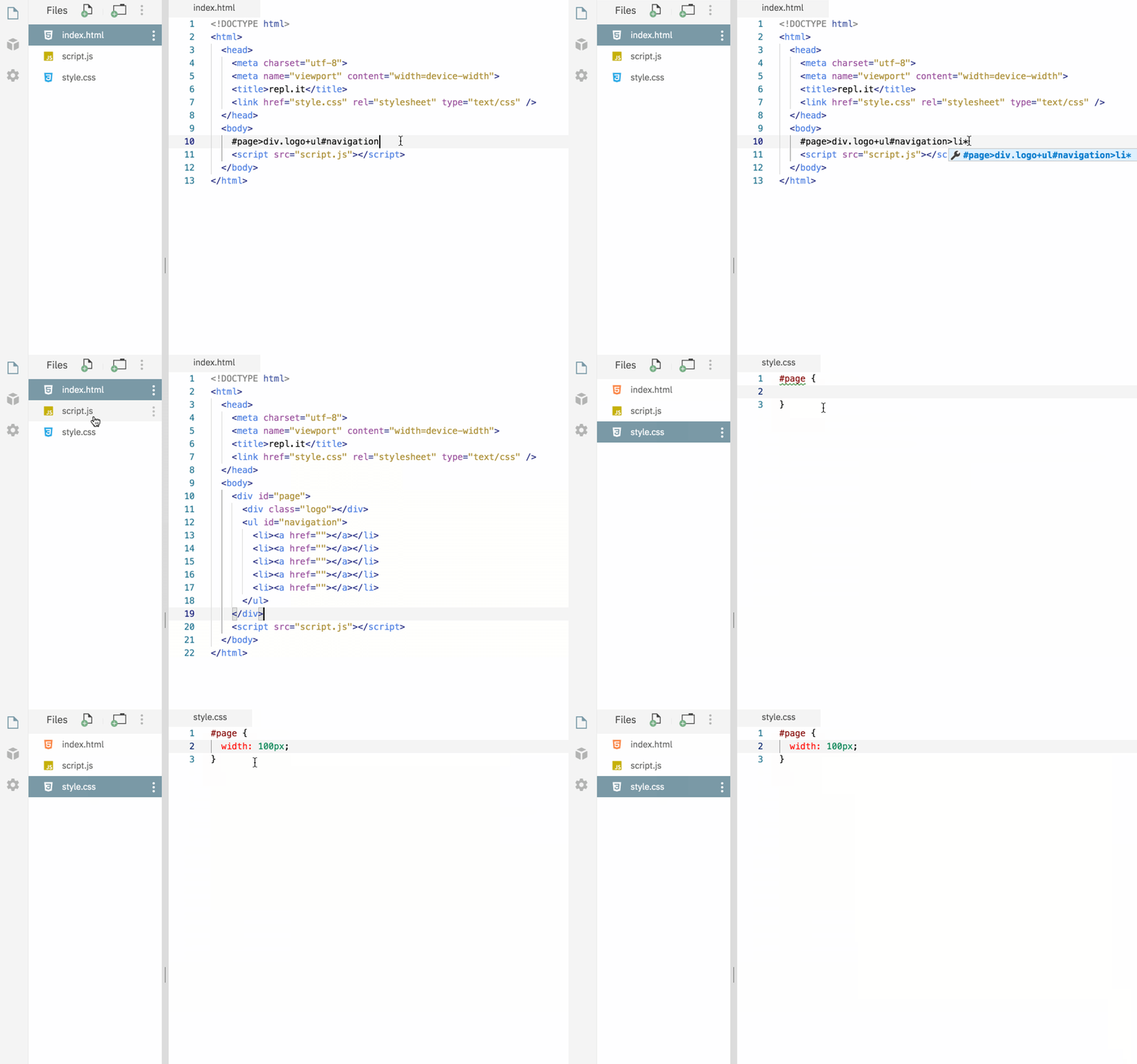
Emmet is a plugin for many popular text editors which greatly improves HTML & CSS workflow, it's also one that's been requested by many of our users. It works for both HTML and CSS and you can use emmet in any repl as long as you're editing an HTML or CSS file. Please check the Emmet docs to learn more about it, and give it a spin by starting a new HTML repl and let us know what you think.
 Wed, Jul 22, 2020
Dear users coming from Glitch
First, at Replit we're not motivated by competition. What we care about the most is making programming and computing more accessible. That means anyone who wants to code and build things should be able to do so without any hurdles. Recently, Glitch, one of our competitors focusing on JavaScript, has blocked pinging services from reaching user apps. Among other things it means they broke the Discord bot experience for their users. We don't have any insight on why they did that but it seems part of a larger change they're going through which also resulted in layoffs. That resulted in a user influx to Replit so I wanted to write this to welcome you to Replit and tell you a little about us. Replit has existed since 2011 and we've been growing the service in a sustainable way that doesn't result in disruptive changes. Building a service like ours is hard, especially for a small team like ours, and we're constantly improving and making things better. But our absolute top priority is being a place coders can depend on -- we will try our absolute best to never let you down.
- Wed, Jul 1, 2020
Multitabs
Repl.it is a great place for prototyping ideas and starting new projects. However as your projects get bigger, the editing experience starts feeling a little limited. That's why we're exciting to announce that we're adding support for tabs! With the new multitab layout, you can open files in new tabs so that you can quickly switch back to them later. There are a few ways of opening a file in a new tab: Ctrl + Click (or Cmd + Click on MacOS) the file in the filetree Drag the file from the filetree directly onto the header or onto an open tab in the header Right click on the file and hit "Open tab" in the menu
- Thu, May 21, 2020
Share where you are in a Repl with Deeplinking
Oftentimes when we're sharing a repl with a friend we want to link them to exactly where we are in our project. Well now you can with deeplinking! Deeplinking allows you to link to any file in your repl as well as specific lines and columns within that file. You may have noticed that the URL hash now changes as you navigate throughout the different files in your project. For example, if you're in src/index.js, it should look something like this: This means that all you have to do to link to the file that you're currently in is copy the URL! This also affects your browser history so if you hit the back button it'll take you to the last file you viewed rather than away from your repl entirely. If you want more granularity in your links, you can add :line or :line:col to the end of the URL. So linking to the 5th line and 12th column in src/index.js looks like this:
 Thu, Apr 30, 2020
Terminal Links
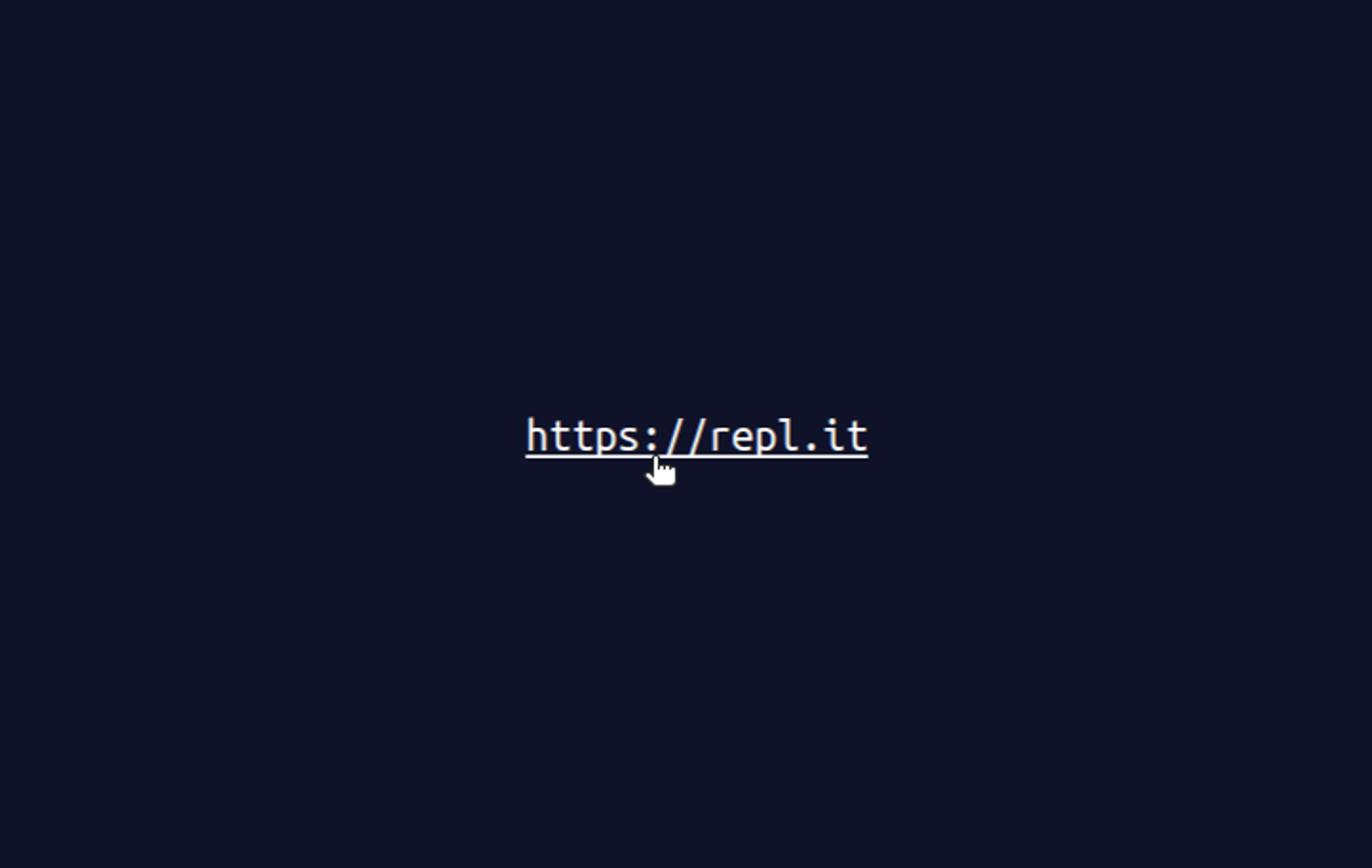
Terminals make it hard to copy things: Selecting text works differently to what people are used to, and ^C aborts the current program. Links are hard to use. Now you can click on links in the repl.it terminal. It's as simple as starting a repl and printing a URL to the terminal. This is super helpful with languages like Rust, which often print URLs in error messages to help you debug and learn.
 Tue, Apr 28, 2020
Improving Repl.it's Mobile UX
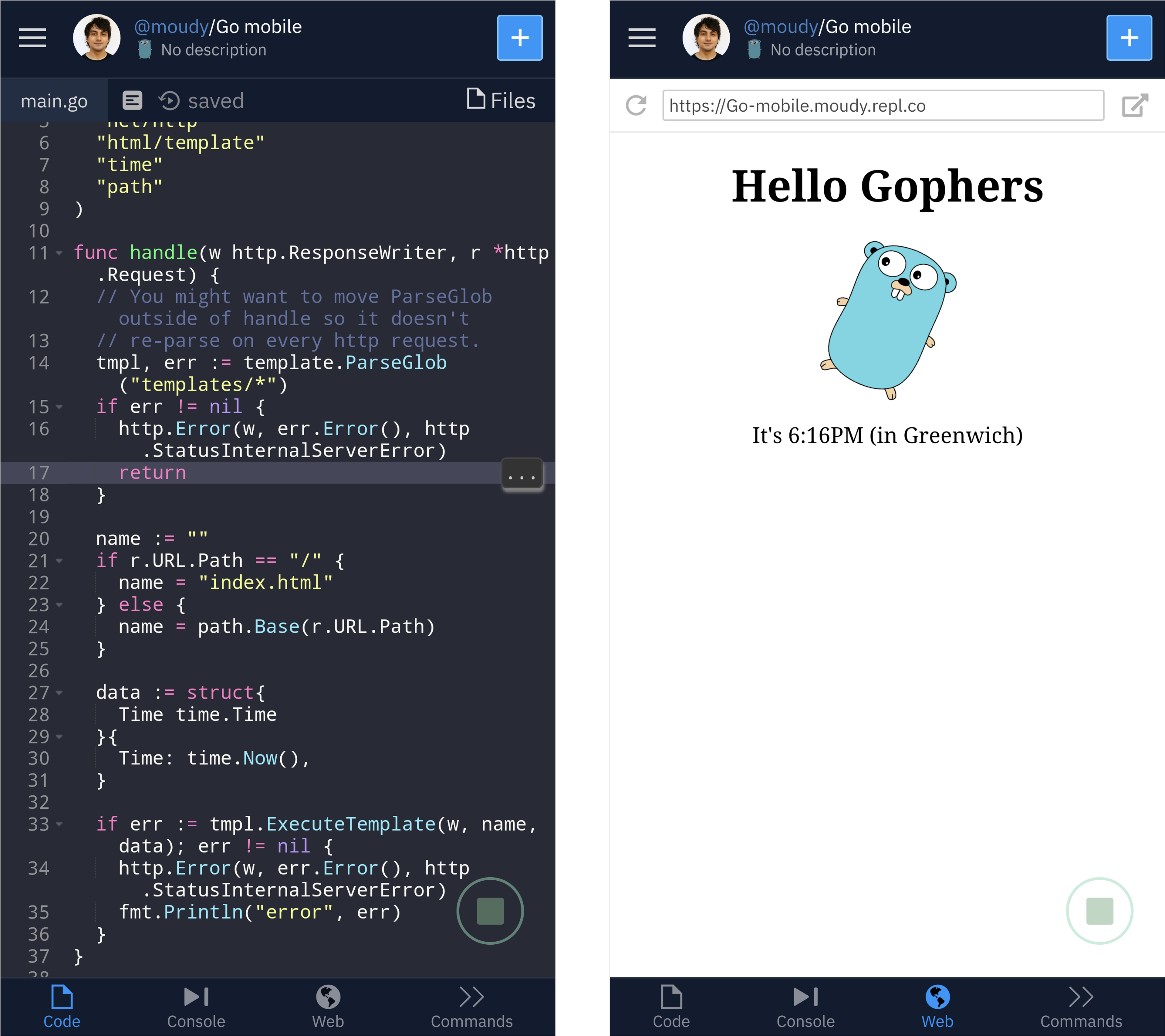
I like the process of writing because of how simple and portable the tools are. Regardless of time or place, a way to write things down is never far away. There's very little friction between inspiration and experimentation. I wish writing code was more like this. In fact, Repl.it is great for quickly experimenting with coding ideas. I can open a tab in my browser and start coding as fast as I can start writing an email. But what if I’m not near my computer? While Repl.it has always worked on phones, it was never optimized for it. That's why we're excited to release our first iteration of a mobile interface! Here's a quick look at running a Go http server using one of our templates: Rather than trying to adapt our desktop layout to a smaller screen we’re building this with native mobile design patterns in mind. We added a tab bar to the bottom of the screen. It acts as the primary navigation for the IDE similar to how native mobile apps do.